椭圆遮罩节点
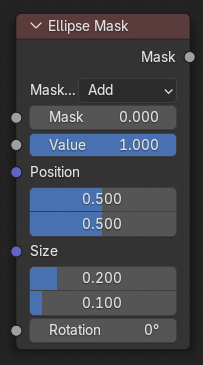
椭圆遮罩 节点通过使用一个椭圆形的简单图案来创建遮罩形状。
输入
- 运算
将输入的遮罩进行集合运算。
- 相加:
将输入的遮罩和已有遮罩进行 结合 操作:生成遮罩的罩盖程度由 值 参数指定。输入遮罩的未显示部分不发生改变或者当无输入遮罩的情况,设置为黑背景。
- 相减:
依据 值 参数和输入遮罩进行相减操作。
- 正片叠底(相乘):
由此得到生成遮罩与输入遮罩的 交集:输入遮罩的值在生成遮罩覆盖的区域内乘以指定 值。其余区域均变为黑色。
- 非:
输入遮罩和生成遮罩所有重叠的部分变为被遮挡。值 参数指定遮挡程度,未被生成遮罩覆盖到的部分维持原有状态不变。
- 遮罩
使用可选择的遮罩做为遮罩操作的基础。
- 数值
生成遮罩的遮挡强度。
- 位置
椭圆中心的位置占总宽度或总高度的比例。(0.5, 0.5 创建一个居中的椭圆形遮罩,0.0, 0.0 创建一个中心点在左下角的椭圆形遮罩。)
- 尺寸
Width/Height of the ellipse as a fraction of the total image width, not height. Equal Width and Height values with produce a circle.
- 旋转
椭圆形遮罩围绕中心点的旋转角度。
输出
- 遮罩
和输入遮罩相合并生成一个椭圆形的遮罩。创建遮罩的大小也就是当前场景能渲染部分的大小。
Tip
For soft edges, pass the output mask through a slight Blur node. For a vignette, pass the output of this through a heavy blur.
用法
The Ellipse Mask node supports an interactive gizmo in the node editor. To enable it, make sure Active Node gizmo is enabled, and select the Ellipse Mask node in the Compositor.
The gizmo allows direct manipulation of the mask shape:
Drag edges to adjust the width or height individually.
Drag corners to adjust width and height simultaneously.
Drag the center cross (X) to move the mask's position.
Drag the center dot to rotate the mask.
拖动边或拐角时按住 Shift 以保持当前纵横比。