简介
雕刻模式 类似于 编辑模式,因为它用于改变绘图的形状,但雕刻模式使用一个非常不同的工作流程:而不是处理单个元素(点和编辑线),使用笔刷改变模型。换句话说,不是选择一组点,而是雕刻模式在笔刷影响区域中操纵绘图。
雕刻模式
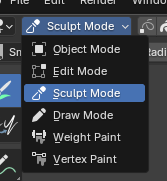
3D视图模式选择:雕刻模式。
雕刻模式可从三维视口标题栏中的 模式 菜单中选择。一旦激活雕刻模式,三维视口中的工具栏将变为雕刻模式专用面板。一个红色圆圈将出现并跟随光标在三维视口中的位置。
雕刻选项
- 选中项遮罩
蜡笔中的雕刻模式允许您选择点或笔画,以将雕刻工具的效果限制为仅绘图的特定区域。
You can use the selection tools in the Toolbar for a quick selection. You can restrict sculpting only on the selected points or strokes with the Selection mode buttons. The three modes can be toggled with 1, 2, or 3 respectively.
- 多重帧
有时您可能需要使用雕刻工具同时修改多个帧。
You can activate multiframe editing with the Multiframe button next to the modes selector (faded lines icon). See Multiframe for more information.
自动遮罩
参考
- 菜单:
- 快捷键:
Shift-Alt-A
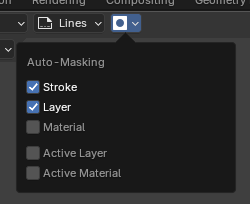
自动遮罩设置。
These properties automatically mask geometry based on stroke, layers and materials under the cursor. It's a quick alternative to frequent manual masking. These masks are initialized on every new tool usage. They are also never visible as an overlay.
These properties can be accessed via a 饼菜单 by pressing Shift-Alt-A.
All auto-masking modes can be combined, which makes the generated auto-mask more specific. For example it's possible to auto-mask strokes that use specific layer and material while excluding others.
- 笔画
Only strokes that are under the cursor when you started the tool are affected.
- 层
Only strokes on the same layers that are under the cursor when you started the tool are affected.
- 材质
Only materials with the same material that are under the cursor when you started the tool are affected.
- 活动层
Only the strokes on the active layer are affected.
- 活动材质
Only the strokes with the active material are affected.
键盘快捷键
反转笔画切换 Ctrl
更改活动材质 U