内插面
参考
- 模式:
编辑模式
- 工具:
- 菜单:
- 快捷键:
I
This tool creates a border of faces around the selected faces, then allows adjusting the thickness of that border by moving the mouse. As the border becomes thicker, the outermost selected faces become thinner (while the inner ones stay the same).
在进行内插时,按住 Ctrl 键可调整内插深度。这与沿法向挤出面操作类似,会沿着每个选定顶点的法线方向移动该顶点,从而导致 所有 面的尺寸发生变化。
内插效果满意后,按下 鼠标左键 或 回车 确认。若需取消,请按下 鼠标右键 或 Esc。
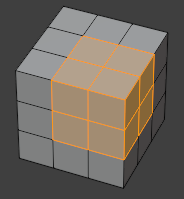
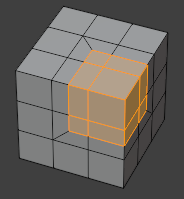
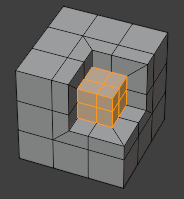
也可以一次性插入多个不相交的 “面片”。
选项
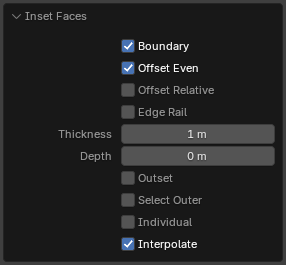
内插面操作选项。
以下列出的键盘快捷键可在插入操作期间使用,并在状态栏中显示。
- 边界 B
同时在边界边上创建边界面(即仅属于一个面而非两个面的边)。
- 均等偏移
Maintain an even border width along the edges. When disabled, the border width will be even at the corners instead.
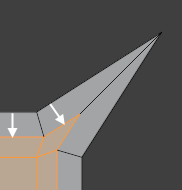
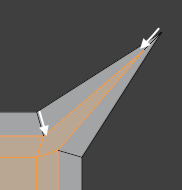
- 相对偏移
将每个边界顶点的宽度和深度偏移量按其两个相邻边界边平均长度进行缩放。
- 并排边
将边界面之间的新边与插入面之间的现有边对齐。
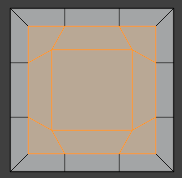
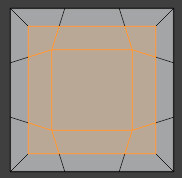
- 厚(宽)度
新创建边界面的宽度。
- 深度 Ctrl
提升或降低插入面的距离。
- 外插 O
使新创建的边界向外扩张,而不是向内收缩。
- 选择外侧
将选中项切换至新创建的边界面。
- 各面 I
每个面单独插入(而不是将每个面片作为连通整体插入)。
- 插值
对新创建的边界顶点进行网格数据插值:UV 坐标、颜色属性、顶点组权重等。