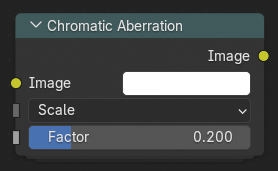
色差节点

色差节点。

The Chromatic Aberration node simulates the dispersion of light caused by a camera lens, where different wavelengths (colors) of light are refracted by slightly different amounts. This effect produces subtle color fringing near edges or high-contrast transitions and can be used for both realistic lens simulation and stylistic distortion effects.

It can also be combined with other post-processing effects such as Vignette or Lens Distortion to create convincing camera imperfections.

输入

图像

Standard color input image.

类型

定义用于生成色差效果的方法。

偏移:

Offsets individual color channels along the X or Y axis. A simple and fast way to create horizontal or vertical color fringing.

缩放:

Scales each color channel differently from the image center, creating a radial dispersion effect.

定向模糊:

Blurs color channels along a specific direction to simulate motion-like chromatic smearing.

镜头色散:

Simulates wavelength-dependent refraction through a lens, creating realistic radial rainbow edges near the image borders.

轴向 偏移

Determines the axis along which channel offsets occur.

垂直:

垂直方向上应用偏移。

水平:

水平方向上应用偏移。

系数

Controls the intensity of the aberration. Higher values increase the separation between color channels and make the effect more visible.

中心 定向模糊

The pivot point around which directional transformations occur. Defined in normalized coordinates (0.0-1.0 across the image).

采样 定向模糊

Sets the number of samples used to compute the directional blur. More samples produce a smoother result but increase computation time. The number of samples is 2ⁿ, growing exponentially with this input.

适配 镜头色散

Scales the resulting image to fit entirely within the frame, avoiding empty borders caused by radial dispersion.

输出

图像

The resulting image with chromatic aberration applied.