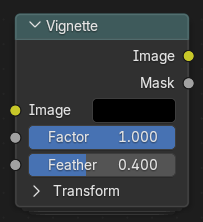
暗角节点
控制添加到图像中的彩色噪点量。数值越高,越会产生明显的彩色斑点,这通常是低光照条件下拍摄的数字图像的典型特征。
输入
- 图像
标准彩色输入图像。
- 系数
控制暗角效果的整体强度。值为 0 时禁用该效果,数值越大,暗角的深色程度或强度越高。
- 羽化
Determines the softness of the vignette transition from the center to the edges. Higher values result in a smoother, more gradual fade.
变换
- 拐角圆度
Adjusts the shape of the vignette corners. A value of 0 produces square corners, while 1 makes the vignette fully circular.
- 缩放
Controls the size of the vignette area. Smaller values make the vignette tighter and more focused near the center.
- 偏移
Shifts the vignette center position along the X and Y axes. Useful for emphasizing a specific area of the image instead of the center.
- 角度
Rotates the vignette mask around the image center.
输出
- 图像
The input image with the vignette effect applied.
- 遮罩
The generated vignette mask as a grayscale output. This can be used for custom compositing or to apply the vignette selectively through mix nodes.