间帧调整
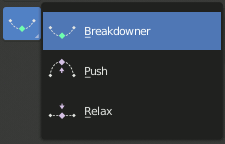
间帧调整工具。
These tools create a new pose which is based on the keys surrounding the current frame. This can help to quickly build up in-betweens from already existing key poses.
将姿态与静置姿态混合
参考
- 模式:
姿态模式和物体模式
- 菜单:
- 菜单:
Blend with Rest Pose linearly interpolates the current pose to the rest position. When blending with a negative factor, the pose is moved away from the rest position. Only one keyframe is needed for this tool unlike two for the other.
从补间姿态推移姿态
参考
- 模式:
姿态模式和物体模式
- 工具:
- 菜单:
- 菜单:
- 快捷键:
Ctrl-E
Push Pose interpolates the current pose away from the linear interpolation between the surrounding keys. On your current frame, imagine a pose that is linearly interpolated from the surrounding keys. That is the base pose that this tool interpolates away from.
松弛姿态到补间姿态
参考
- 模式:
姿态模式和物体模式
- 工具:
- 菜单:
- 菜单:
- 快捷键:
Alt-E
Relax Pose is the opposite of Push Pose from Breakdown. Hence at full influence, the resulting pose will be identical to a linear interpolation between the surrounding keys.
姿态补间器
参考
- 模式:
姿态模式和物体模式
- 工具:
- 菜单:
- 菜单:
- 快捷键:
Shift-E
在当前帧创建一个合适的补间姿态。
通过在工具处于活动状态时按下以下键,"补间(Breakdowner)" 工具可以约束在特定变换和轴上工作:
G, R, S: 移动、旋转、缩放
B: 柔性骨骼
C: 自定义属性
X, Y, Z: 对应轴向
混合至邻帧
参考
- 模式:
姿态模式和物体模式
- 菜单:
- 菜单:
- 快捷键:
Shift-Alt-E
使用时间轴中的相邻关键帧转换当前姿态。为了使该操作工作,在当前帧之前和之后必须有一个关键帧。